Nolabnoparty

IT TechPills
Menu
  • Home
  • About
  • Publications
  • Virtualization
    • Omnissa
      • App Volumes
      • DEM
      • Horizon
    • Proxmox
    • VMware
      • vSphere
      • vSAN
    • Analyzer
      • Opvizor
      • Runecast
      • vRealize
      • Turbonomic
    • AWS
    • PernixData
    • StarWind
  • Backup
    • Hornetsecurity
    • Iperius
    • Micro Focus
    • Nakivo
    • RecoverPoint
    • Veeam
    • Vinchin
    • Vembu
    • vSphere Replication
  • Microsoft
    • Active Directory
    • Office 365
    • Windows Server
  • Home Lab

“Access Denied” SSH error with Putty in Windows 7

Paolo Valsecchi 20/03/2013 No Comments Reading Time: 1 minute

loginssh01

Using PuTTY in Windows 7 as SSH client to connect Linux systems, you receive a denied error message. Because Windows 7 doesn’t include an SSH client, the open source tool PuTTY  is the most used by administrators.

When you try performing an SSH connection to a Linux client using PuTTY, after inserting the username and before entering the password system replies with an error message:

Access denied

loginssh02

Logging in through the console, error is not shown.

loginssh03


Procedure

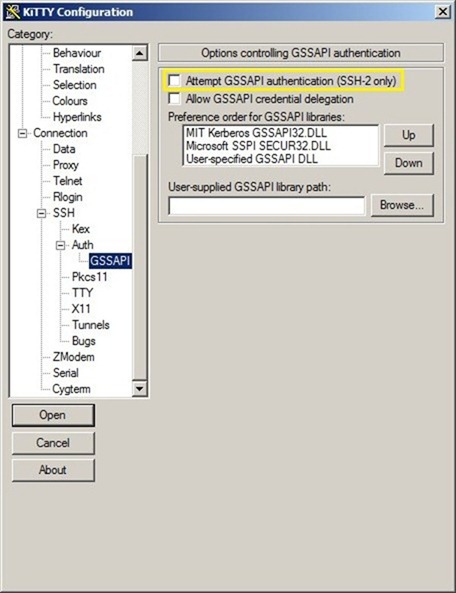
This problem is due to the encryption GSSAPI options enabled by default in PuTTY and this must be disabled.

Start PuTTY and create a new connection. Go to section Connection > SSH > Auth > GSSAPI and disable the option Attempt GSSAPI authentication (SSH-2 only).
loginssh04

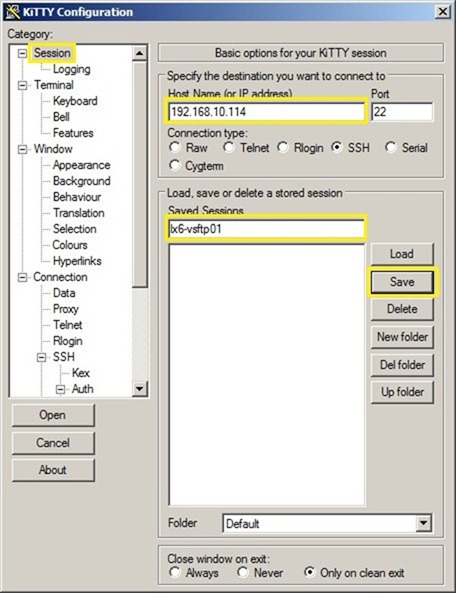
In the Session panel enter the Host Name (or IP address) to connect with and save the session giving a name in the Saved Sessions field.
loginssh05

Trying once again to establish an SSH connection with the Linux client, error is no longer displayed.

loginssh06

With this fix the problem is quickly solved without any red status or network services interruption.

ssh windows 7 1

Tweet Share Share Pin it WhatsApp Telegram

Related Posts

SQL Server 2012: upgrade edition

SQL Server 2012: upgrade edition

Upgrade AD FS 3.0 to Windows Server 2016/2019

Upgrade AD FS 3.0 to Windows Server 2016/2019

Windows DC boots in safe mode after full restore

Windows DC boots in safe mode after full restore

Migrate Azure AD Connect to a new server

Migrate Azure AD Connect to a new server

ADFS 3.0 install WAP Server - pt. 4

ADFS 3.0 install WAP Server - pt. 4

Migrate Active Directory to Windows 2012 R2 - pt. 1

Migrate Active Directory to Windows 2012 R2 - pt. 1

About The Author

Paolo Valsecchi

System Engineer, VCP-DCV, VCP-DM, vExpert, VMCE, VMCA, Veeam Vanguard, ACE. Working experience focused on VMware vSphere, Omnissa Horizon, Microsoft Active Directory, and Backup/DR solutions.

awards
  • English
  • Italiano

Buy Me A Coffee

Search

x linkedin youtube instagram rssita rsseng

YouTube

Subscribe to my YouTube channel


Backup, Data Protection and DR

NEWSLETTER

Get new posts by email:

PARTNERS

nakivo starwind

Categories

Archives

Most popular

  • Veeam High Availability Cluster: switchover and disassemble - pt.3
    Veeam High Availability Cluster: switchover and disassemble …
  • How to upgrade Object First OOTBI cluster
    How to upgrade Object First OOTBI cluster
  • Veeam Backup for Microsoft 365 v8.5 released
    Veeam Backup for Microsoft 365 v8.5 released
  • Veeam Tape Library error "VBR isn't current owner"
    Veeam Tape Library error "VBR isn't current …
  • Omnissa Edge Gateway upgrade
    Omnissa Edge Gateway upgrade
  • Nakivo v11.2.1 with Proxmox VE 9.1 full support
    Nakivo v11.2.1 with Proxmox VE 9.1 full …
  • Object First Fleet Manager
    Object First Fleet Manager
  • Veeam High Availability Cluster: failover and automation - pt.2
    Veeam High Availability Cluster: failover and automation …
  • How to configure the Veeam High Availability Cluster - pt.1
    How to configure the Veeam High Availability …

Latest posts

  • How to upgrade Object First OOTBI cluster
    How to upgrade Object First OOTBI cluster
  • Veeam Backup for Microsoft 365 v8.5 released
    Veeam Backup for Microsoft 365 v8.5 released
  • Veeam Tape Library error "VBR isn't current owner"
    Veeam Tape Library error "VBR isn't current owner"
  • Omnissa Edge Gateway upgrade
    Omnissa Edge Gateway upgrade
  • Nakivo v11.2.1 with Proxmox VE 9.1 full support
    Nakivo v11.2.1 with Proxmox VE 9.1 full support
  • Object First Fleet Manager
    Object First Fleet Manager
  • Veeam High Availability Cluster: switchover and disassemble - pt.3
    Veeam High Availability Cluster: switchover and disassemble - pt.3
  • Veeam High Availability Cluster: failover and automation - pt.2
    Veeam High Availability Cluster: failover and automation - pt.2

YOUTUBE


Latest published video

About me

author My name is Paolo Valsecchi and I'm an IT Professional.

This blog is mainly focused on virtualization, data protection, VDI technologies but also covers Active Directory and Networking.

You can find detailed how-to guides, tutorials and product reviews.

View my profile on LinkedIn

Follow me

Nolabnoparty Copyright © 2026.
Advertise | All rights reserved. 
  • English
  • Italiano
This site uses cookies from Google to deliver its services, to customize ads and for traffic analyzer. If you continue browsing we consider you accept the use of cookies.