If you are running Ceph Reef in your Proxmox infrastructure and plan to upgrade to Proxmox 9, you must first upgrade Ceph Reef to Squid to meet the prerequisites.
As a best practice, before proceeding with the upgrade make sure to have a working backup of your VMs and Containers.
Prerequisites
To upgrade Ceph Reef to Squid, make sure all nodes are running Proxmox VE 8.2 (or higher) and Ceph is on version Reef (18.2.4-pve3 or higher).
Verify the installed Proxmox version.
# pveversion

Check the installed Ceph cluster version.
# ceph --version

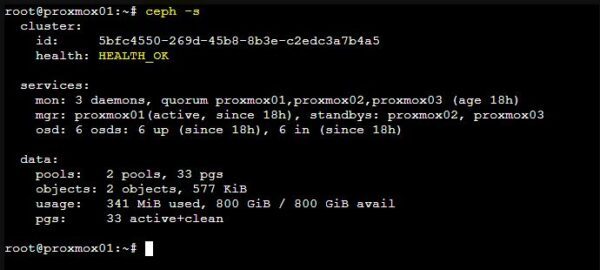
Confirm the Ceph cluster is in a healthy state.
# ceph -s
Prepare the system
On all nodes, change the Ceph repositories from Reef to Squid.
# sed -i 's/reef/squid/' /etc/apt/sources.list.d/ceph.list

Verify the /etc/apt/sources.list.d/ceph.list file contains the correct entry. For users with a valid subscription, the entry should be:
deb https://enterprise.proxmox.com/debian/ceph-squid bookworm enterprise
# cat /etc/apt/sources.list.d/ceph.list

If you don't have a valid subscription, use the publicly available no-subscription repository.
deb http://download.proxmox.com/debian/ceph-squid bookworm no-subscription
# cat /etc/apt/sources.list.d/ceph.list

To prevent the Ceph cluster from rebalancing during the upgrade, set the noout flag.
# ceph osd set noout

Upgrade Ceph Reef to Squid cluster
Once the system is prepared to upgrade Ceph Reef to Squid, you can begin the upgrade process. Perform these steps on each node, one at a time.
Place the first node in Maintenance Mode to stop HA services. Optional but suggested.
# ha-manager crm-command node-maintenance enable proxmox01

Verify the node is in Maintenance Mode.

Refresh the repositories package.
# apt update

Install the latest updates.
# apt full-upgrade

Exit the node from Maintenance Mode.
# ha-manager crm-command node-maintenance disable proxmox01

Check the Ceph version. Ceph Squid 19.2.2 should be displayed.
# ceph --version

Repeat this process for all remaining nodes, keeping the noout flag set throughout the entire procedure.
Post upgrade
After upgrading all nodes, verify that the Ceph cluster is in a healthy state. A "noout flag(s) set" health warning is normal at this stage.
# ceph -s

From the Proxmox GUI, select a node and go to Ceph > Monitor. The reported Version should be the old value that needs to be updated.

Check the monitor version on one node. It should report "min_mon_release 18 (reef)".
# ceph mon dump | grep min_mon_release

Restart the monitor on each node where a monitor runs.
# systemctl restart ceph-mon.target

After restarting all monitors, ensure the upgrade is complete. It should now report "min_mon_release 19 (squid)".
# ceph mon dump | grep min_mon_release

If the daemon manager doesn't restart automatically, manually restart it on the nodes where it is enabled.
# systemctl restart ceph-mgr.target

Verify that both the monitor and manager versions are 19.2.2 within the Proxmox UI under Ceph > Monitor.

Now go to Ceph > OSD and check the OSDs Version. Some disks need to be updated.
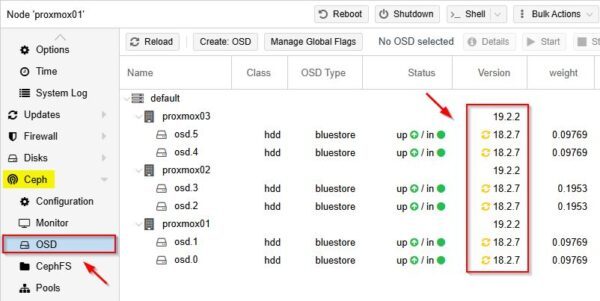
Restart all OSDs on each node. To avoid data loss, run the command one node at time.
# systemctl restart ceph-osd.target

After restarting all OSDs on all nodes, verify the OSD Version is 19.2.2 in the Proxmox UI under Ceph > OSD.

After all OSDs are running the latest version, you may see a health warning "all OSDs are running squid or later but require_osd_release < squid".
# ceph -s
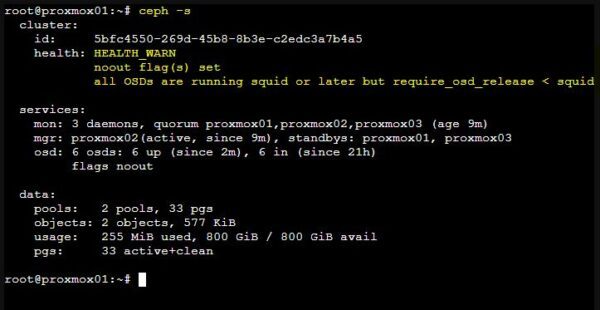
To fix this, disallow pre-Reef OSDs and enable all new Squid-only functionality.
# ceph osd require-osd-release squid

Checking the Ceph cluster, it is now in a healthy state with the noout flag set.
# ceph -s
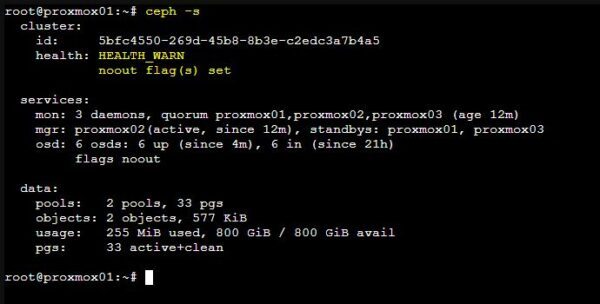
The last step is to unset the noout flag.
# ceph osd unset noout

The Ceph Squid cluster is now in a healthy state.
# ceph -s
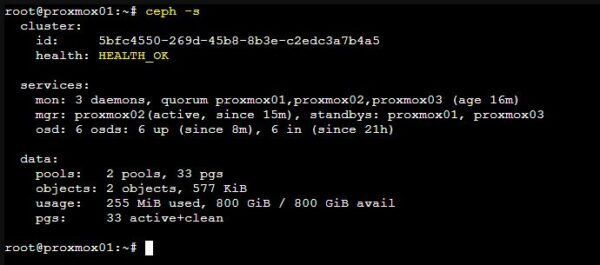
Your Ceph cluster has now been successfully upgraded from Reef to Squid. This completes the prerequisite for the Proxmox 8 to 9 upgrade.