
The release of version 9, introduces new features and significant improvements making the Proxmox VE 8 to 9 upgrade worthwhile.
By upgrading, you gain access to the latest features, critical security patches, and performance optimizations.
Prerequisites for Proxmox VE 8 to 9 upgrade
Before proceeding with he upgrade process, it's essential to prepare your system.
- Make sure you have a valid backup of your VMs and Containers.
- Check if the root partition has at least 5 GB free (10 GB or more recommended).
- The first step is to update all nodes to the latest Proxmox VE 8 version (8.4.1 or later). Check your current version by running the command:
# pveversion

- If Ceph cluster is installed, you must first upgrade it to Ceph 19.2 Squid before starting the Proxmox VE 8 to 9 upgrade.
# ceph --version

- If Proxmox Backup Server is installed, upgrade the PBS to version 4 before upgrading Proxmox VE.
Before the upgrade
Ensure that all VMs and Containers have been migrated off the node.

Place the node in Maintenance Mode to stop HA services.
# ha-manager crm-command node-maintenance enable pve01

The node is in Maintenance Mode.
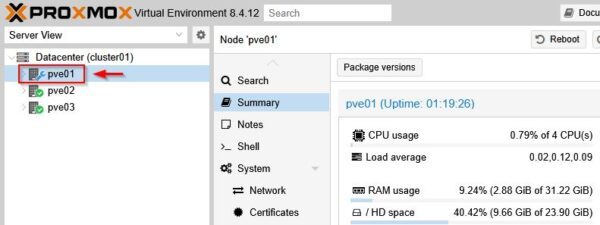
If your cluster is using Ceph for hyperconverged storage, you must prevent the cluster from attempting to rebalance data while the node is offline.
# ceph osd set noout

This article has been written for StarWind blog and can be found in this page. It covers the full procedure to upgrade Proxmox VE 8 to 9.
After the cluster upgrade
After the Proxmox VE 8 to 9 upgrade, you should check if the all nodes are up and running and the infrastructure is working as expected.
Check again the Proxmox cluster status.
# pvecm status
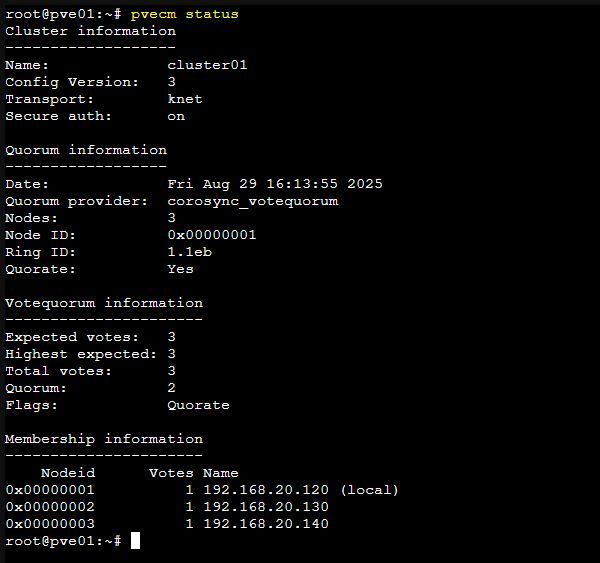
Check if the Ceph cluster is in a healthy state.
# ceph -s
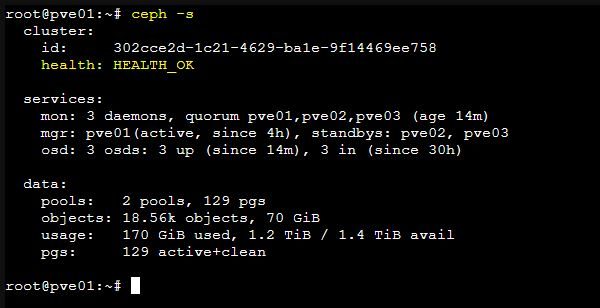
If you are using HA and HA groups, HA groups will be automatically migrated to HA rules once all cluster nodes have been upgraded to Proxmox VE 9.
Proxmox is now running version 9.
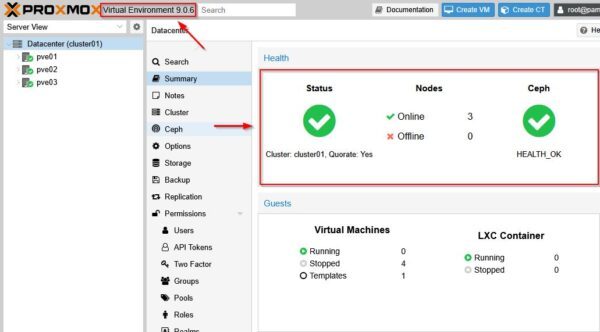
Wrap up
Proxmox 9 introduces new features and enhancements, primarily focused on storage, networking, and high-availability management. Careful planning will ensure a smooth upgrade from Proxmox VE 8 to 9.
Before you begin, make sure you have working backups of your VMs and Containers in case something goes wrong.
Read the full article on StarWind blog.