


During Windows 7 sysprep, the procedure stops with the message “A fatal error occurred while trying to sysprep the machine“.
Problem occurs using an answer file or running the sysprep’s GUI.
From the elevated Command Prompt, run the sysprep command.
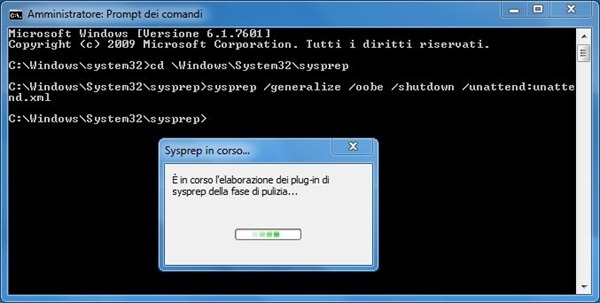
The process stops with an error message.


To troubleshoot the problem, the sysprep log is a good starting point. During sysprep, a log named sylogerr.log is created in folder C:\Windows\System32\sysprep\Panther.

Analyzing the log, it reports the following:
Error [0x0f0085] SYSPRP LaunchDll:Could not load DLL c:\Program Files\Microsoft Security Client\MSESysprep.dll[gle=0x0000007e]
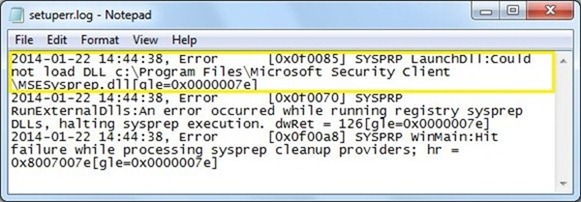
Looking for the DLL in folder C:\Program Files\Microsoft Security Client\MSESysprep.dll as reported in the log, the directory doesn’t exist under C:\Program Files\.
The missing DLL belongs to Microsoft Security Essential package that haven’t been uninstalled properly.
Fix 1
Because the missing DLL is due to Microsoft Security Essential, you can reinstall the program then, if you don’t want it as part of master image, uninstall it afterwards checking that all parts of the package are properly removed.

Fix 2
Easiest way to fix this matter is removing the orphan key left in the registry by Microsoft Security Essential package.
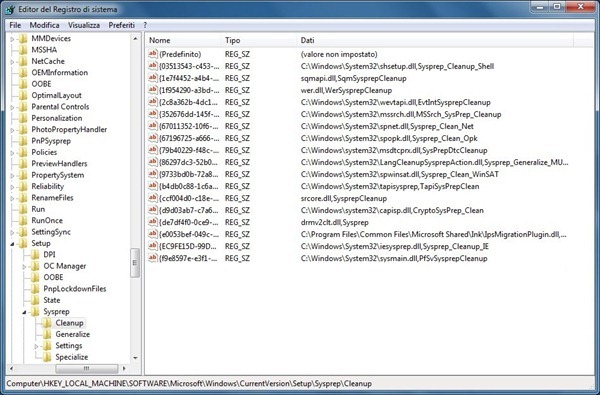
Open the Registry Editor. The string to be removed from the registry is located in:
HKLM\software\Microsoft\Windows\CurrentVersion\Setup\Cleanup

Identify the string:
2D153B43-11B4… C:\program files\Microsoft Security Client\MSESysprep.dll,DllSysprep_Cleanup
Because this is a protected string, you need to change the permission of the key to deleted it. From the Registry Editor select the key then go to menu Edit > Permissions.

Give the group Users Full Control permissions to the key then click OK.

Right click the registry key then select Delete option.

A warning message is shown. Click Yes to confirm key deletion.

The key is no longer listed.
Launching the sysprep once again, the process runs smoothly.
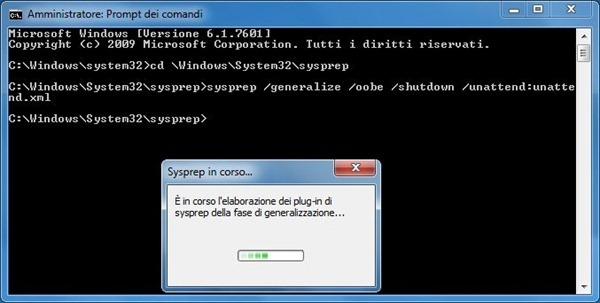
Solution tested several times, it’s quick, easy and it works perfectly without having to install MSE again.





Paolo,
Thanks so much. I had tried a lot of other solutions. Yours worked.
Yorgus
Glad you found my work useful.