
Nolabnoparty

IT TechPills
Menu
  • Home
  • About
  • Publications
  • Virtualization
    • Omnissa
      • App Volumes
      • DEM
      • Horizon
    • Proxmox
    • VMware
      • vSphere
      • vSAN
    • Analyzer
      • Opvizor
      • Runecast
      • vRealize
      • Turbonomic
    • AWS
    • PernixData
    • StarWind
  • Backup
    • Hornetsecurity
    • Iperius
    • Micro Focus
    • Nakivo
    • RecoverPoint
    • Veeam
    • Vinchin
    • Vembu
    • vSphere Replication
  • Microsoft
    • Active Directory
    • Office 365
    • Windows Server
  • Home Lab

vCSA 6.0 login error with vSphere Client

Paolo Valsecchi 07/04/2015 No Comments Reading Time: 1 minute

loginvcsa60error01

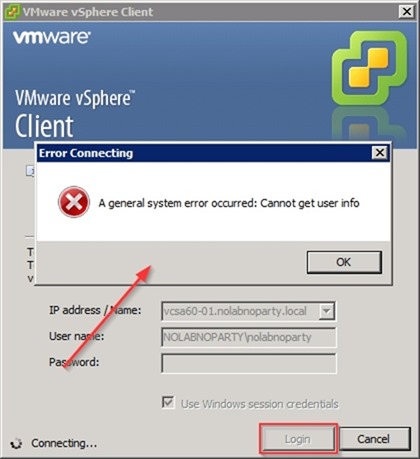
Logging in to vCenter Server Appliance using vSphere Client with option "Use Windows session credentials" fails with a vCSA 6.0 login error.

The error displayed is the following:

A General System error occurred: Cannot get user info
loginvcsa60error02


Procedure

To fix this matter, establish an SSH connection with vCSA and enter the root credentials to login.

loginvcsa60error03

Enable the Bash shell running the shell.set --enabled true command.

# shell.set --enabled true

loginvcsa60error04

Start the Bash shell running the shell command.

# shell

loginvcsa60error05

Edit the file /etc/nsswitch.conf and locate the entry:

passwd: compat ato

# vi /etc/nsswitch.conf

loginvcsa60error06

Add the item lsass to this entry then save and exit the /etc/nsswitch.conf file.

passwd: compat ato lsass

loginvcsa60error07

Restart vpxd with the command:

# /etc/init.d/vmware-vpxd restart

loginvcsa60error08

Type exit command to logout the shell.

# exit

loginvcsa60error09

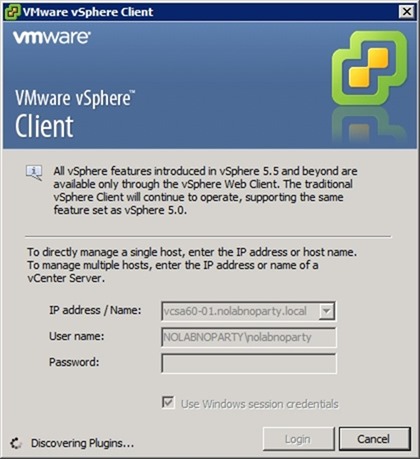
Close the vCSA SSH session and open the vSphere Client. Login the vCenter Server Appliance enabling Use Windows session credentials option.
loginvcsa60error10

This time the login is successful and the logged username is reported at the bottom right side of the screen.

loginvcsa60error11

The access to vCSA can now be established using the Windows session credentials option.

firma

Tweet Share Share Pin it WhatsApp Telegram

Related Posts

vSphere VMs encryption: encrypt virtual machines - pt.3

vSphere VMs encryption: encrypt virtual machines - pt.3

Runecast free analytics for healthcare

Runecast free analytics for healthcare

Top vBlog 2018 results - Nolabnoparty spot #40

Top vBlog 2018 results - Nolabnoparty spot #40

StarWind Cloud VTL for AWS and Veeam

StarWind Cloud VTL for AWS and Veeam

Veeam Backup for Office 365 v4.0: setup Object Storage as Repository - pt.2

Veeam Backup for Office 365 v4.0: setup Object Storage as Repository - pt.2

Altaro VM Backup 7.6

Altaro VM Backup 7.6

About The Author

Paolo Valsecchi

System Engineer, VCP-DCV, VCP-DM, vExpert, VMCE, VMCA, Veeam Vanguard, ACE. Working experience focused on VMware vSphere, Omnissa Horizon, Microsoft Active Directory, and Backup/DR solutions.

awards
  • English
  • Italiano

Buy Me A Coffee

Search

x linkedin youtube instagram rssita rsseng

YouTube

Subscribe to my YouTube channel


Backup, Data Protection and DR

NEWSLETTER

Get new posts by email:

PARTNERS

nakivo starwind

Categories

Archives

Most popular

  • Veeam High Availability Cluster: switchover and disassemble - pt.3
    Veeam High Availability Cluster: switchover and disassemble …
  • Veeam Backup for Microsoft 365 v8.5 released
    Veeam Backup for Microsoft 365 v8.5 released
  • Veeam Tape Library error "VBR isn't current owner"
    Veeam Tape Library error "VBR isn't current …
  • Omnissa Edge Gateway upgrade
    Omnissa Edge Gateway upgrade
  • Nakivo v11.2.1 with Proxmox VE 9.1 full support
    Nakivo v11.2.1 with Proxmox VE 9.1 full …
  • Object First Fleet Manager
    Object First Fleet Manager
  • Veeam High Availability Cluster: failover and automation - pt.2
    Veeam High Availability Cluster: failover and automation …
  • How to configure the Veeam High Availability Cluster - pt.1
    How to configure the Veeam High Availability …
  • Scaling Omnissa App Volumes Manager with Kemp load balancer
    Scaling Omnissa App Volumes Manager with Kemp …

Latest posts

  • Veeam Backup for Microsoft 365 v8.5 released
    Veeam Backup for Microsoft 365 v8.5 released
  • Veeam Tape Library error "VBR isn't current owner"
    Veeam Tape Library error "VBR isn't current owner"
  • Omnissa Edge Gateway upgrade
    Omnissa Edge Gateway upgrade
  • Nakivo v11.2.1 with Proxmox VE 9.1 full support
    Nakivo v11.2.1 with Proxmox VE 9.1 full support
  • Object First Fleet Manager
    Object First Fleet Manager
  • Veeam High Availability Cluster: switchover and disassemble - pt.3
    Veeam High Availability Cluster: switchover and disassemble - pt.3
  • Veeam High Availability Cluster: failover and automation - pt.2
    Veeam High Availability Cluster: failover and automation - pt.2
  • How to configure the Veeam High Availability Cluster - pt.1
    How to configure the Veeam High Availability Cluster - pt.1

YOUTUBE


Latest published video

About me

author My name is Paolo Valsecchi and I'm an IT Professional.

This blog is mainly focused on virtualization, data protection, VDI technologies but also covers Active Directory and Networking.

You can find detailed how-to guides, tutorials and product reviews.

View my profile on LinkedIn

Follow me

Nolabnoparty Copyright © 2026.
Advertise | All rights reserved. 
  • English
  • Italiano
This site uses cookies from Google to deliver its services, to customize ads and for traffic analyzer. If you continue browsing we consider you accept the use of cookies.