


Veeam Backup Validator is a non documented tool located into the installation folder of Veeam software and used to validate backup files.
Backup Validator is a CLI based tool for validating the backup files but it doesn't perform the controls made by SureBackup. For those who have the Standard license only where SureBackup is not available, backup consistency can be done through this tool.
Procedure
To use this tools the backup files to analyze must be registered in Veeam Server. Open Veeam Backup and Replication and check which backups are available to validate.

To check a specific VM backup job, open the Command Prompt and type the command:
Veeam.Backup.Validator.exe /backup:"backup_name" /vmname:vm_name
C:\…>Veeam.Backup.Validator.exe /backup:"backup small vms [ manual ]" /vmname:lx-smallvm01

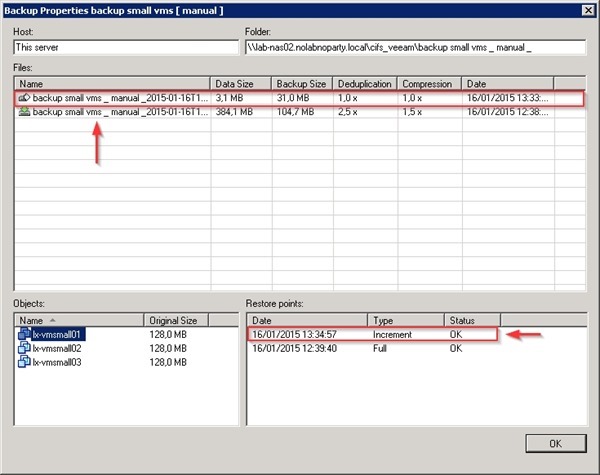
To validate a backup at specific date or time, from Backup & Replication section select Backups > Disk. Right click the backup job name to process and select Properties option to check available restore points.

Take note of the date or time of the specific restore point. Click OK to close the window.
Open the Command Prompt and type the command:
Veeam.Backup.Validator.exe /backup:"backup_name" /time:pointtime
C:\…>Veeam.Backup.Validator.exe /backup:"backup small vms [ manual ]" /time:13.30

The validation result.

To check the help menu for available parameters, at the Command Prompt type the command:
C:\Program Files\Veeam\Backup and Replication\Backup\Veeam.Backup.Validator.exe /?

The tool is very useful during troubleshooting. If the result is negative perhaps the backup file is corrupt then no need to further investigate.


