


When you try to deploy a Veeam Worker in a Proxmox VE environment, you might encounter the error "Cannot access a closed Stream".
This error prevents the Worker from deploying correctly and, consequently, stops you from backing up the Proxmox VE platform.
Cannot access a closed Stream error
The "Cannot access a closed Stream error" typically appears during the Worker's deployment. This issue arises when the local storage is not enabled in Proxmox VE.

To check status of the local storage, go to Datacenter > Storage and check if the local storage is Enabled. In this example the storage is disabled.

How to fix the error
To successfully deploy the Veeam Worker, the local storage must be enabled. Select the local storage and click Edit.

Check the Enable box and click OK to save the changes.

Once you have enabled the local storage, return to the Veeam console and try to deploy the Worker again. Right-click the worker and select Test.

The Worker should now deploy successfully.

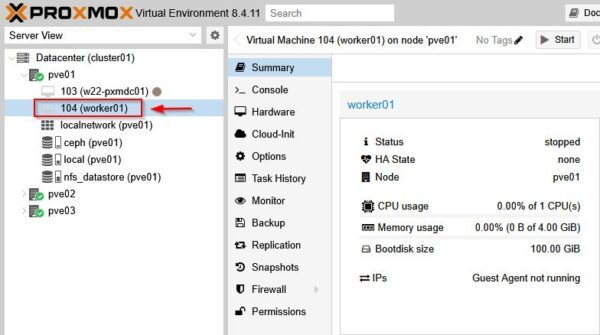
You can confirm the successful deployment by checking the Proxmox VE environment, where you'll see the newly deployed Worker.
While it may seem like a good idea to disable or hide local storage from the Proxmox console, if you are using Veeam Backup & Replication as your backup solution, the local storage object must be enabled for the Veeam Worker to deploy and function correctly avoiding the error "Cannot access a closed Stream error".





Thank you so much!
Was going crazy about that error....
Just for others, it is not "enough" that it is enabled, ISO Images, must also be selected.
Veeam is apparently hardcoded to put the ISO on "local" storage.
Let's be more specific as the problem is ISO uploading. If you do not enable the ISO content on local, you get the same error again. Veeam defaults to upload the PveWorker img file to local iso storage. No confirmation. May be in the future 🙂