


When connecting vCenter Server through vSphere Client, the Summary tab shows the error “Quick stats on hostname is not up-to-date”.
This is a known issue in vCenter Server 5.5.
Configuration Issues
Quick stats on hostname is not up-to-date

Fix
The workaround to fix this issue consists in adding two parameters to Advanced Settings in vCenter Server.
- vpxd.quickStats.HostStatsCheck
- vpxd.quickStats.ConfigIssues
Using vSphere Web Client, go to vCenter Server instance and select Manage > Settings > Advanced Settings then click Edit button.

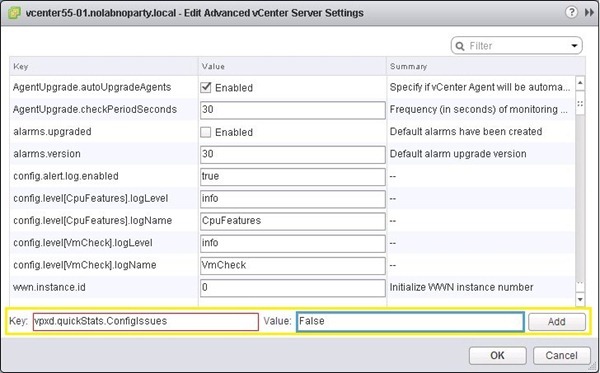
Fill the Key and Value fields as follow:
Key:   vpxd.quickStats.HostStatsCheck
Value: False
Click Add when done.

Fill the Key and Value fields as follow:
Key:   vpxd.quickStats.ConfigIssues
Value: False
Click Add when done.
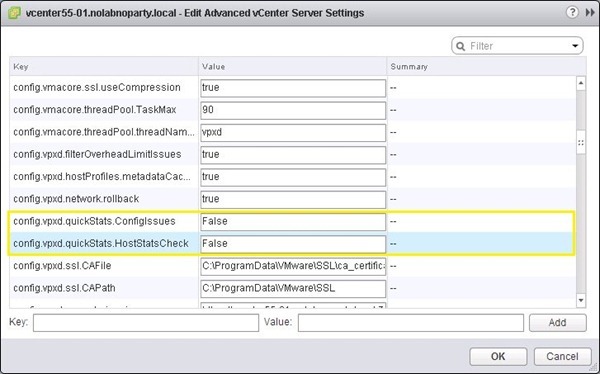
Click OK to save the configuration.
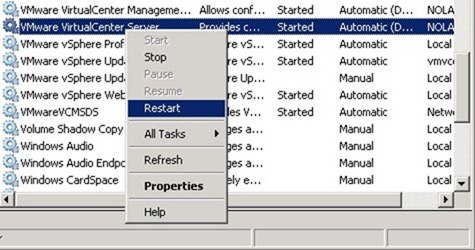
Restart the vCenter Server services.
Accessing vCenter Server with vSphere Client again, the warning message is no longer shown.

For any concern, refer to the VMware KB article.


fantastic my dear friend
Thanks. Glad you appreciate my effort.
Hey there! I've been reading your blog for a long time now
and finally got the courage to go ahead and give you a shout out from Humble Tx!
Just wanted to mention keep up the great job!
Feel free to surf to my blog post - liftmaster garage door opener troubleshooting