


With the release of VMware VCF 9, many organizations are now facing a key question: "Is the VMware VCF 9 upgrade worth the cost and complexity?"
VMware Cloud Foundation (VCF) 9 appears to be a significant strategic decision with a number of potential benefits, especially for organizations looking to modernize their private cloud infrastructure.
The new design and management concepts in VCF 9 might raise questions for those who are used to previous vSphere environments. A successful upgrade requires a different approach to installation and management, as well as a certain level of knowledge and skill.
Is the VMware VCF 9 upgrade worth it?
To evaluate if the upgrade can benefit your business and meet the demands of your services, it's useful to break down VCF 9's features by specific areas.
Cost and storage efficiency
The new global deduplication feature offered in vSAN 9 can be a good point to consider when planning a VCF 9 upgrade. Unlike previous versions that were limited to a single disk, this works across the entire cluster, offering a much higher deduplication ratio.
The result is a substantial reduction in your storage capacity needs, which directly lowers costs and provides a significant reduction in your storage TCO (Total Cost of Ownership).
Simplified management
VCF 9.0 introduces a unified console for operations and automation, which solves the problem of using fragmented management tools (picture from VMware).
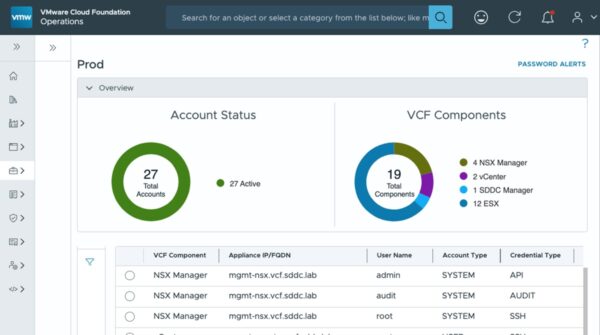
The availability of a single dashboard to monitor vSAN, SAN, and NAS environments provides a global overview of your storage infrastructure from a single pane of glass.
Additionally, the new Site Maintenance Mode for stretched clusters and simplified upgrade processes save time for IT teams by reducing manual work and the potential for human error.
Performance
Organizations that are running, or plan to run, modern applications such as AI, containers, and machine learning can experience significant performance benefits after the VCF 9 upgrade (picture from VMware).

VCF 9 offers capability designed to boost performance, reduce latency, and increase VM density. Advanced memory tiering with NVMe, enhanced data paths with kernel optimizations, and native Kubernetes integration are some features focused to improve performance. Storage cluster performance can improve up to 25%.
Security and resilience
VCF 9.0 introduces several features to improve security and business continuity. The native vSAN-to-vSAN replication feature offers a robust disaster recovery solution with a very low RPO (1 minute), allowing services to be recovered in a matter of minutes.

The platform also includes new security dashboards, automated certificate rotation, and compliance scans to ensure a secure and resilient private cloud.
Simplified upgrade process
The capability to import existing vSAN environments (HCI and stretched clusters) into the VCF platform is a significant advantage to be considered when planning a VCF 9 upgrade.
This allows organizations to migrate their existing setups to VCF 9, centralizing management and leveraging the full VCF feature set without the burden of rebuilding their already running environments, which saves a considerable amount of time.
Considerations and potential challenges
Before planning a VCF 9 upgrade, you should consider some aspects that could present a challenge for the IT department.
Architecture changes
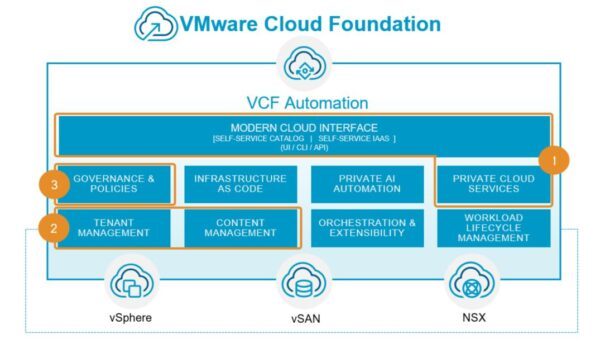
The VCF 9.0 upgrade procedure is not a simple task that can be done with a few clicks. It's a change that impacts and redefines how a private cloud platform operates. This requires a certain level of expertise from IT personnel and may necessitate changes in how your infrastructure is currently managed (picture from VMware).
Pre-upgrade checks
One of the biggest challenges during a VCF 9 upgrade is dealing with critical and potential incompatibilities that arise during the pre-check phase.
For example, some Aria Automation features may no longer be available in VCF 9.0, which could cause the upgrade procedure to fail.
Licensing
Broadcom has significantly changed the licensing model and the traditional vSphere Standard and Enterprise Plus editions will no longer be available after version 8. To ensure that new features are accessible after completing the VCF 9 upgrade, a careful review of your current licensing strategy is required to avoid service disruption.
Hardware compatibility
To leverage some of the advanced features, such as DPU offloading and NVMe memory tiering, you may need specific hardware. Before proceeding with the VCF 9 upgrade, you should confirm that your current infrastructure's hardware can fully benefit from the new capabilities (picture from VMware).
Wrap up
To determine if a VCF 9 upgrade is a worthwhile investment for your organization, you should assess if your business requirements align with the following key benefits:
- Reducing storage costs and increasing efficiency.
- Running or planning to run modern applications (AI, machine learning, containers).
- Simplifying and centralizing management.
- Implementing a robust and efficient disaster recovery strategy.
However, the VCF 9 upgrade requires a good understanding of the new architecture, careful planning, and a review of your existing environment to ensure a smooth transition and maximize the benefits.


