Migrating from VMware Horizon to Omnissa is more than just a name change but it’s a structural and architectural shift in the VDI landscape.
While a direct upgrade (in-place) might seem like the shortest path, it often leads to technical debt or broken automation due to the massive rebranding of registry keys, file paths, and licensing modules.
Migrating from VMware Horizon to Omnissa: technical differences
The first difference we notice after upgrading from VMware Horizon to Omnissa is the new graphics and logos.

The new graphic for the Omnissa Administration console.
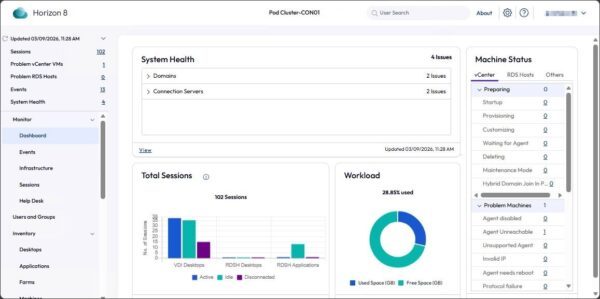
But behind the scenes, there are several aspects that must be considered when evaluating a direct upgrade versus a greenfield installation.
ADAM / AD LDS database
Rebranding the product has impacted the AD LDS partition name, which has changed from VMware to Omnissa naming:
Old: DC=vdi,DC=vmware,DC=int

New: DC=vdi,DC=horizon,DC=internal
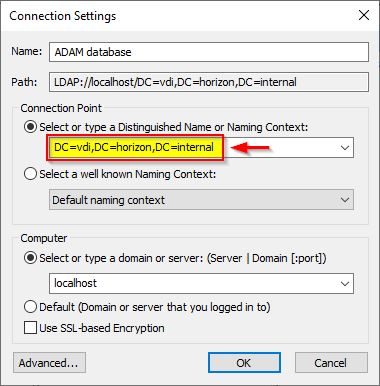
Omnissa provides a script to migrate to the new distinguish name available in the KB 6000797.
Although the components upgrade from VMware Horizon to Omnissa can be done separately from the AD LDS partition migration, potential issues and unpredictable behaviors may arise potentially breaking the production environment if the script fails or is interrupted.
Additionally the database itself is being renamed (e.g., VMwareVDMDS to OmnissaHzeDS) and an in-place upgrade attempts to migrate this schema. Any third-party monitoring tool pointing to the old instance name will immediately lose connection.
Folder structure
The branding shift has moved not only from cosmetic (graphics, logos) side but it has also impacted file systems and registries. A direct upgrade from VMware Horizon to Omnissa doesn't just overwrite files but it has to move them.
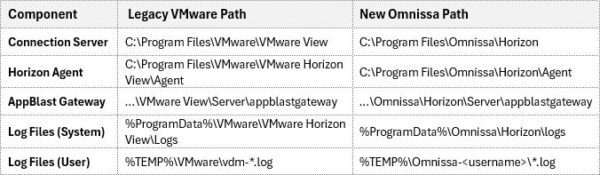
If you have scripts, backup agents, or monitoring tools like ControlUp or Goliath that look for specific paths, they will break after an upgrade.
Registry
After a direct upgrade, you often end up with zombie registry keys. The installer attempts to migrate settings, but legacy keys often remain, leading to confusion for the OS.
The main hive shift:
Old: HKLM\SOFTWARE\VMware, Inc.\VMware VDM
New: HKLM\SOFTWARE\Omnissa\Horizon
When DEM is used, user-level registry settings for the Horizon Client (like saved server or Log on as Current User) rely on these registry entries. A direct upgrade may not reliably migrate them, forcing users to re-type their Connection Server URLs.
Performing a direct upgrade means you have to track down every legacy VMware registry key and file path to ensure they aren't causing conflicts.
Group Policy templates (ADMX)
To accommodate the name and path changes, new ADMX templates must be used within your Active Directory environment to avoid incorrect references impacting VDI services.
The most critical change is the Full Qualified Name (FQN) of the policy categories.
Old: Computer Configuration > Policies > Administrative Templates > VMware Horizon Server Configuration
New: Computer Configuration > Policies > Administrative Templates > Omnissa Horizon Server Configuration
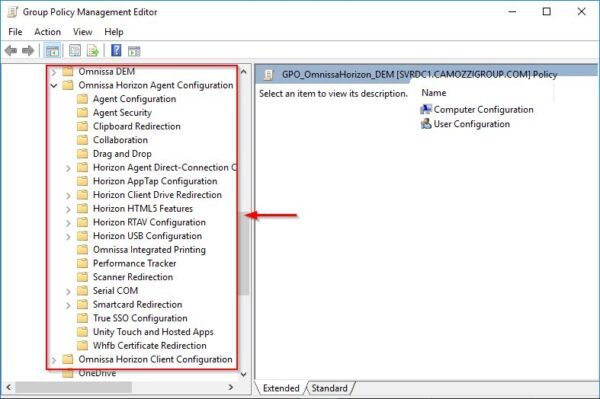
Because the internal GUIDs and paths for these templates have changed, existing VMware GPOs will not automatically map to the new Omnissa registry keys.
License
Last but not least, the licensing mechanism has also changed. After migrating from VMware Horizon to Omnissa, you cannot simply reuse your existing keys but they must be converted or re-issued via the new Omnissa Portal.
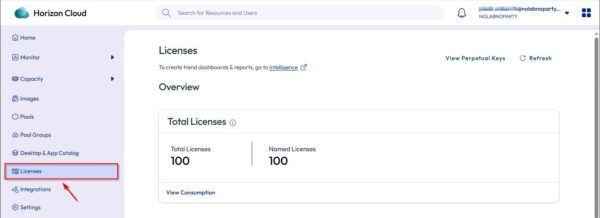
Omnissa is aggressively moving away from perpetual licenses. If you are transitioning to a SaaS subscription, the license is entitled through the Horizon Cloud Connector or Horizon Edge.
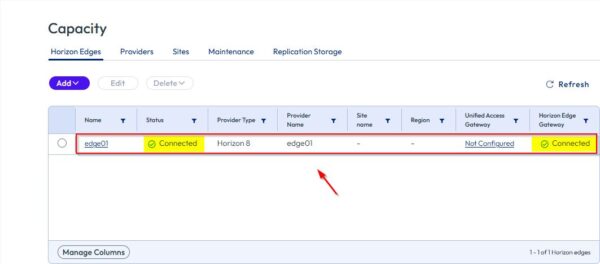
Although a direct upgrade triggers a 60-day grace period, if the new Omnissa license key format isn't applied, the console will enter Restricted Mode.
Additional info about licensing changes can be found in KB 6000212.
Wrap up
The migration from VMware Horizon to Omnissa isn't a standard update but it is an infrastructure reset.
When you factor in the critical ADAM database partition renames, the complete shift in registry and file paths, the new license keys, and the necessity of new ADMX templates, pros and cons for a direct upgrade becomes incredibly unbalanced.
By choosing a Greenfield build, you aren't just avoiding a potentially broken upgrade script but you are giving your organization a clean, high-performance foundation on the new Omnissa platform.