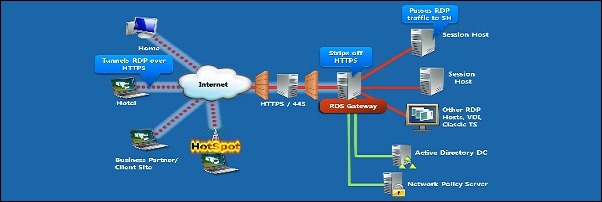
VMware Horizon 6 RDS Application Pools allow administrators to deliver a single application to many users. The application runs on a farm of RDS hosts. Before proceeding with the …
In VMware Horizon 6 an RDS Desktop Pool is based on a session to an RDS host that allow users to remotely access a desktop and applications. RDS Desktops …
Linked-Clone Desktop images are one or more copies of a parent virtual machine that share the virtual disks of the parent but which operate as individual virtual machines. Using …
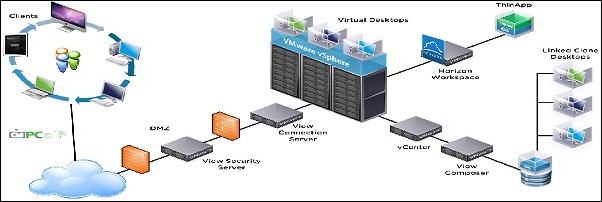
View Composer Server is a VMware Horizon 6 service that enable the management of desktop pools called linked-clone desktops by creating master images that share a common virtual disk. …
In VMware Horizon 6 an RDS Host is the server that hosts Windows-based programs or the full Windows desktop for Remote Desktop Services clients. This part will cover the …
Once VMware Horizon 6 has been installed, we need to do some configuration in the system: create the AD service account, setup the vCenter role and link the Connection …
VMware Horizon 6 is a desktop virtualization solution that delivers virtual desktop services. To implement Horizon, several components need to be installed and configured. First step concerns the Connection Server installation. Previously named …
During the configuration process of the PernixData FVP Cluster, you are unable to add SSD due to unlisted devices. As first troubleshooting step, it’s necessary to figure out if …
VMware Compliance Checker for vSphere is a free tool to check the compliance of your vSphere environment against the VMware vSphere Hardening Guidelines. Running this tool you can ensure …
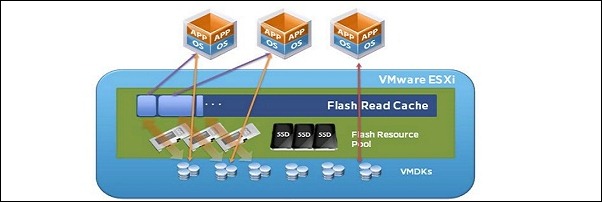
vSphere 5.5 Flash Read Cache (vFRC) is a new feature that allows you to leverage host local SSDs in a very effective way. The benefit is the offload of …
This site uses cookies from Google to deliver its services, to customize ads and for traffic analyzer. If you continue browsing we consider you accept the use of cookies.