One of the underrated features provided by Veeam Backup and Replication is the Four-Eyes Authorization capability.
Available starting from Veeam v12.1, Four-Eyes Authorization is designed to reduce the risk of actions that could impact backup data.
Certain sensitive operations protected by this feature require an additional approval from another user before they can be executed. It’s important to note that immutable backups are not affected by Four-Eyes Authorization, even when this feature is enabled, these backups cannot be deleted.
Four-Eyes Authorization protection
Once Four-Eyes Authorization is enabled, the following operations require an additional approval:
- Purge backup files, snapshots from the disk and the configuration database.
- Delete information about unavailable backups from the configuration database.
- Remove backup repositories and storage within the infrastructure.
- Create, modify or remove users and groups.
- Reset MFA for a specific user.
- Manage global automatic logoff configurations.
How it works
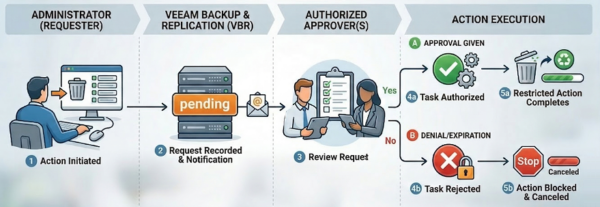
For example, if an Administrator wants to remove an Orphaned backup from the infrastructure, they must request approval. To approve such a request, the user must have either the Veeam Backup Administrator or Veeam Security Administrator role.
The workflow of the process is illustrated in the image below.
This article has been written for StarWind blog and can be found in this page. It covers the full procedure to use the Four-Eyes Authorization in Veeam.
Checking performed approvals
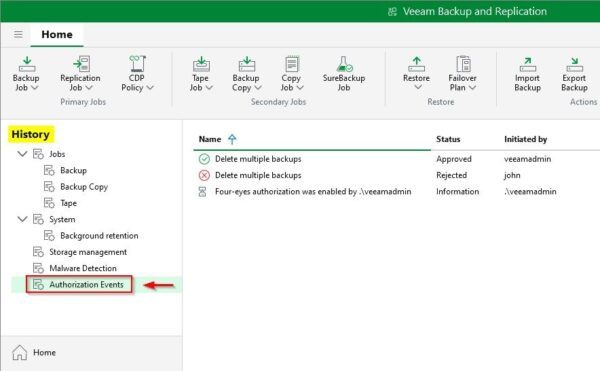
Events related to Four-Eyes Authorization can be viewed under History > Authorization Events.
By enabling Four-Eyes Authorization, you significantly increase the security of your backup infrastructure protecting it against inappropriate operations, even in the event of a compromised account.
Read the full article on StarWind blog.